
Task deadline
The "Task deadline" setting provides for a time limit for task completion.

Three settings are available:
-
Unlimited - the default setting that does not limit tasks by time:

-
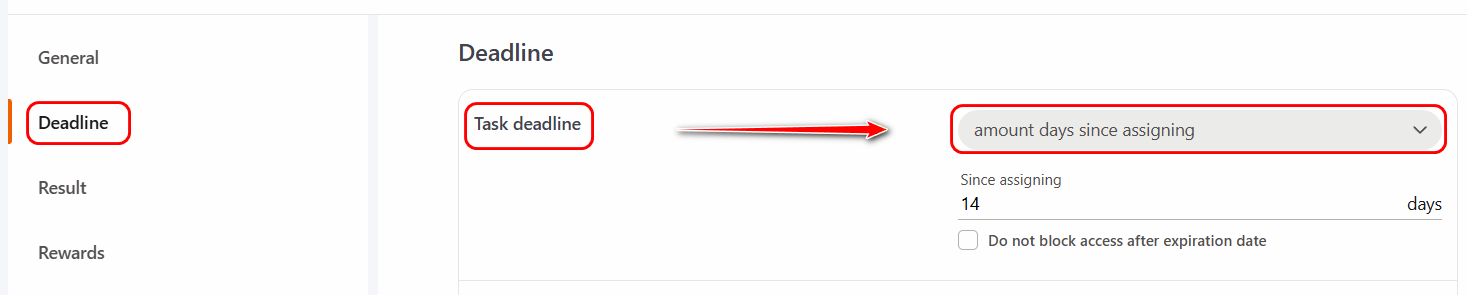
Amount days since assigning - a setting that determines the number of days during which the task will remain available. The countdown starts automatically from the date the task is assigned to the user. When selecting this setting, it is imperative to specify the calendar number of days of access to the task.
Do not block access after expiration date - if the option is enabled (the checkbox is checked), users can complete the task after the deadline.
- Calendar period - the time limit for completing the task is defined by specific calendar dates. It is also possible to restrict access to the task within specified hours.
Do not block access after expiration date - if the option is enabled (the checkbox is checked), users can complete the task after the deadline.
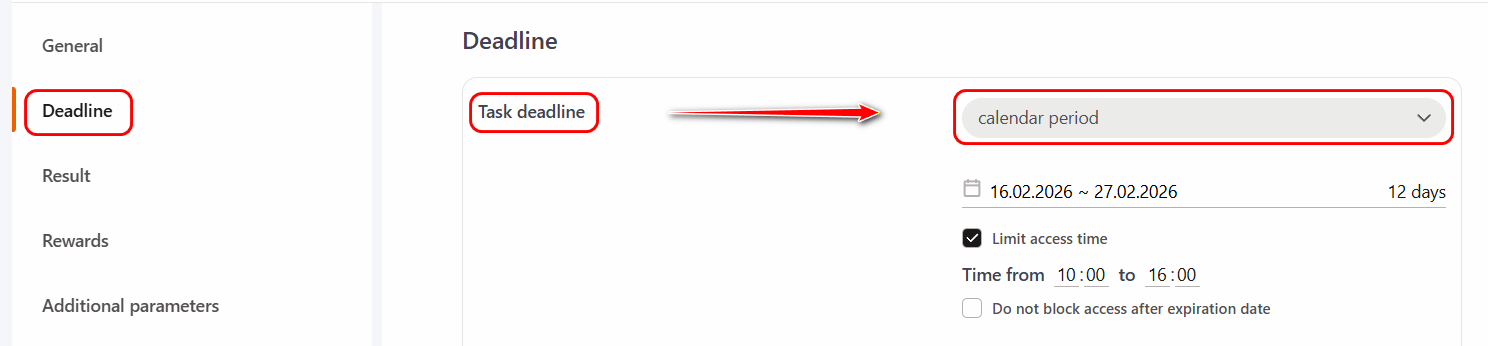
The access time limit works only for starting a task. For example, if the user managed to start the task within the specified time period, the expiration of the access time will not interrupt the task - the user will be able to finish the task and get a mark. But if the access period ends, the system will not allow the user to start the task - the task will be failed.