
Integration with Signal
Unlike other messengers, Signal does not have a centralized service (API) through which messages can be sent directly from the LMS.
Therefore, integration uses a separate service, signal-cli-rest-api, which runs on a server and operates as a Signal device.
In effect, a “virtual device” is created, connected to your account as a trusted device. Messages are sent on its behalf.
Because of this, the integration requires deploying the service on the client’s side, so it is primarily suitable for On-Premise versions rather than SaaS.
More details about deploying the service are available on GitHub.
Therefore, integration uses a separate service, signal-cli-rest-api, which runs on a server and operates as a Signal device.
In effect, a “virtual device” is created, connected to your account as a trusted device. Messages are sent on its behalf.
Because of this, the integration requires deploying the service on the client’s side, so it is primarily suitable for On-Premise versions rather than SaaS.
More details about deploying the service are available on GitHub.
After deploying the service, you need to specify URL API end point (1) in the LMS (for example: http://cbr-signal-api-1:8080).
After that, a QR code will be displayed, which must be scanned in Signal on a mobile phone to add a trusted device.
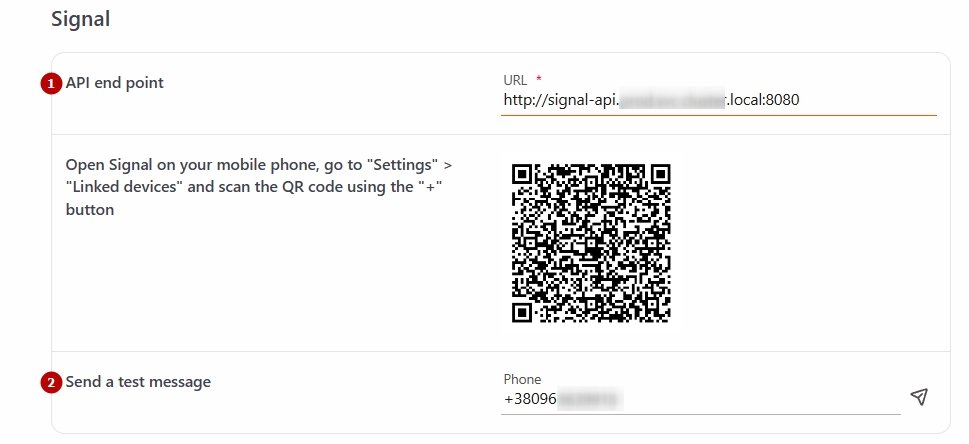
To verify the correctness of the settings, enter a phone number in international format in the field Send a test message (2) and click the Send button to receive a test message and check the integration functionality.